TUI
Layout model
The TUI uses a five-pane layout. The panes are stable and only reflow on explicit resize events.
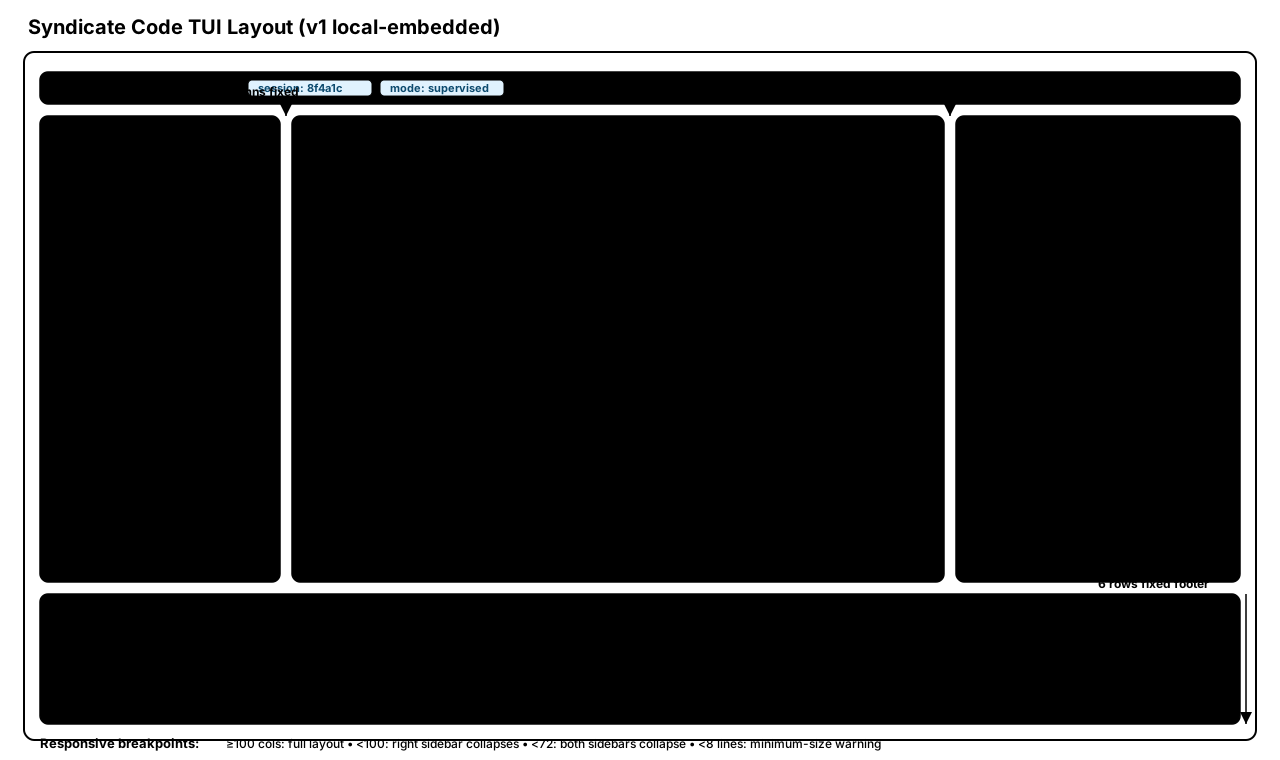
Dimensions (tui_build_spec.md §3.2):
- Title bar: full width, 1 line
- Left sidebar: 24 columns fixed
- Right sidebar: 28 columns fixed
- Footer: full width, 6 lines (4 chat history + 1 mode badge row + 1 input row)
- Main pane: remaining width, full height between title and footer
Responsiveness
Runtime breakpoints (tui_build_spec.md §3.3):
| Terminal width | Layout |
|---|---|
| >= 100 columns | Full five-pane layout |
| < 100 columns | Right sidebar collapses; main pane expands |
| < 72 columns | Both sidebars collapse; main pane fills full width |
Additional rules:
- Minimum height is 8 lines; below that, a minimum-size warning is shown.
- Title bar and footer remain full width at all widths.
- Pane toggles:
Ctrl+L(left),Ctrl+R(right),Ctrl+B(both).
Pane content
Title bar
Title-bar fields are pushed from sessionState and rendered directly (tui_build_spec.md §4, operator_interface_spec.md OI-002b):
- Left: app name and session/workspace identity snapshot
- Center: governance state pills and pending checkpoint count (amber when > 0)
- Right: active provider/model and wall-clock HH:MM
Left sidebar
Left-sidebar sections (tui_build_spec.md §5):
- Workspace file tree with git-status dots
- Active specialists with capability tier indicators
- Active skills list
Main pane
Main-pane structure (tui_build_spec.md §6):
- Tab strip
- Content area
- Checkpoint bar when
session.pending_checkpoint_count > 0
Right sidebar
Right-sidebar sections (tui_build_spec.md §7):
- Upper: GOVERNANCE panel (execution envelope scope, trust summary, permit expiry, active provider)
- Lower: EVIDENCE STREAM (live event feed, max 50 items)
Evidence dot colors:
- permit issued: blue
- tool call: green
- checkpoint: amber
- trust violation: red
- denial: red
- approval: green
Footer
Footer rows (tui_build_spec.md §8):
- Rows 1-4: chat history
- Row 5: mode badge
- Row 6: active input
Mode badge values from session.approval_mode:
governed · envelope    -> default
governed · per-step    -> amber
governed · restricted  -> red
local-only             -> gray
Authority model
The TUI has no authority.
The TUI is a read surface and an intent surface. It renders what the control plane emits and forwards what the operator decides.
- The checkpoint bar does not halt execution. The control plane already halted execution and surfaced a pending decision in
checkpoint_pending.- Pressing
[y]does not approve anything by itself. It forwards an operator decision message to the control plane, which recordsapproval_decision, evaluates policy, issues a permit, and resumes execution.- The TUI can crash, hang, or run in multiple instances. Enforcement remains at control plane and tool layer.
Spec citation: operator_interface_spec.md OI-002, OI-002a.
Checkpoint presentation
Collapsed checkpoint bar (tui_build_spec.md §6.2):
[TYPE TAG] [message ...] [reversible|cannot be undone] [allow [y]] [deny [n]] [details [d]]
Type-tag colors:
scope: ambercapability: redtrust: coral/orangeirreversible: red boldprovider: blue
Detail expansion (d) shows two columns (tui_build_spec.md §6.3):
- Left: field-level change rows (
was -> now) and trigger description - Right: per-boundary trust-state bars and evidence classes
Operator response keys:
y: sendsApprovalDecisionMutation(decision: ALLOW)n: sendsApprovalDecisionMutation(decision: DENY)d: expand detail viewi: inspect full canonical form in context inspector?: help overlay
Invariants:
- No checkpoint is auto-approved because of timeout, inactivity, or failure.
- Irreversible actions require a second confirmation step.
Spec citation: operator_interface_spec.md INV-OI-006, INV-OI-009.
Keyboard bindings
| Key | Action |
|---|---|
y | Approve pending checkpoint |
n | Deny pending checkpoint |
d | Expand checkpoint detail |
i | Open context inspector |
Ctrl+L | Toggle left sidebar |
Ctrl+R | Toggle right sidebar |
Ctrl+B | Toggle both sidebars |
Tab | Cycle focus forward |
Shift+Tab | Cycle focus backward |
Ctrl+Tab | Cycle main pane tabs |
j / k | Scroll down / up in focused pane |
Alt+Up / Alt+Down | Scroll evidence stream |
Escape | Cancel or dismiss overlay |
F1 | Help |
F5 | Refresh layout |
? | Help overlay |
q / Ctrl+C | Quit or interrupt workflow |
/ | Enter command mode in footer input |
Sources: tui_build_spec.md §3-§9, operator_interface_spec.md §11.
Rendering tiers
Rendering is tiered and runtime-detected (operator_interface_spec.md OI-010, OI-011):
| Tier | Condition | Behavior |
|---|---|---|
| Full TUI | True color + mouse support | Bubble Tea full rendering |
| 16-color TUI | 16-color terminal, no mouse | Reduced palette, no mouse |
| ANSI plain text | TTY without full color features | Structured ANSI text |
| Plain text / JSON | No TTY or governance-suspended/headless run | Plain text or --output json |
Failure at a higher tier falls back to the next tier; it does not enter an error state.
Subscription model
Each pane renders a separate control-plane subscription projection. The control plane pushes state updates; the TUI does not poll (operator_interface_spec.md OI-002b, §18.7).
| Pane | Subscription |
|---|---|
| Title bar | sessionState |
| Right sidebar — governance | activeEnvelope |
| Right sidebar — evidence stream | evidenceFeed |
| Checkpoint bar | pendingDecisions |
| Footer mode badge | approvalMode |
| Main pane streaming output | turnOutput |